Developer Documentation
Everything you need to build with the Atech platform.
Learn How It Works
See how to go from an idea to working hardware in minutes.
Pre-order Hardware
Reserve the Early Adopter Kit. Assembled in Denmark, delivered in 3–4 weeks.
Getting Started
Atech is a modular electronics platform. You describe what you want to build in plain text, and the platform generates a hardware configuration with working ESP32 firmware code. Pre-built modules snap onto a motherboard — no soldering, no breadboards.
- Describe your project in the prompt box on the home page
- The AI analyzes your request and selects the right modules
- You get a board layout, wiring diagram, and generated firmware
- Drag and drop modules to customize the layout
- Flash the firmware to your ESP32 directly from the browser
Board Layouts
Every project targets the same motherboard:
- 14-Port Board — Landscape perimeter layout with 12 usable ports and 8 adjacent pairs for double-width modules.
Each port is a physical connector on the motherboard. Modules plug into one or two adjacent ports depending on their size.
Module Reference
Each module emits events (sensor readings, button presses, state changes) and optionally accepts actions (commands sent to the device). The schema below is the exact JSON envelope your firmware exchanges with the dashboard or USB bridge — same shape on both transports. Click a module to expand its capabilities.
 Temperature & Humidity
aht20_sensor·2 events·0 actions
aht20_sensor·2 events·0 actionsEvents
| Event key | Type | Value | Unit | Description |
|---|---|---|---|---|
temperature | sensor | float | C | Temperature reading in Celsius{"type":"sensor","key":"temperature","value":23.5,"module_type":"aht20"} |
humidity | sensor | float | %RH | Relative humidity percentage{"type":"sensor","key":"humidity","value":65.2,"module_type":"aht20"} |
Actions
No actions accepted by this module.
 Air Quality
scd40_air_quality·3 events·0 actions
scd40_air_quality·3 events·0 actionsEvents
| Event key | Type | Value | Unit | Description |
|---|---|---|---|---|
co2 | sensor | int | ppm | CO2 concentration in parts per million{"type":"sensor","key":"co2","value":712,"module_type":"scd40"} |
temperature | sensor | float | C | Temperature reading in Celsius (from the SCD40's onboard sensor used for CO2 compensation){"type":"sensor","key":"temperature","value":23.5,"module_type":"scd40"} |
humidity | sensor | float | %RH | Relative humidity percentage (from the SCD40's onboard sensor used for CO2 compensation){"type":"sensor","key":"humidity","value":48.1,"module_type":"scd40"} |
Actions
No actions accepted by this module.
 Distance Sensor
vl53l5cx_distance·2 events·0 actions
vl53l5cx_distance·2 events·0 actionsEvents
| Event key | Type | Value | Unit | Description |
|---|---|---|---|---|
distance | sensor | int | mm | Distance measurement in millimeters{"type":"sensor","key":"distance","value":1250,"module_type":"vl53l5cx"} |
min_distance | sensor | int | mm | Minimum distance across all 64 zones{"type":"sensor","key":"min_distance","value":450,"module_type":"vl53l5cx"} |
Actions
No actions accepted by this module.
 Orientation Sensor
icm40608_imu·11 events·0 actions
icm40608_imu·11 events·0 actionsEvents
| Event key | Type | Value | Unit | Description |
|---|---|---|---|---|
accel_x | sensor | float | g | X-axis acceleration in g{"type":"sensor","key":"accel_x","value":0.98,"module_type":"icm40608"} |
accel_y | sensor | float | g | Y-axis acceleration in g{"type":"sensor","key":"accel_y","value":0.05,"module_type":"icm40608"} |
accel_z | sensor | float | g | Z-axis acceleration in g{"type":"sensor","key":"accel_z","value":0.12,"module_type":"icm40608"} |
gyro_x | sensor | float | deg/s | X-axis rotation rate in degrees/second{"type":"sensor","key":"gyro_x","value":12.5,"module_type":"icm40608"} |
gyro_y | sensor | float | deg/s | Y-axis rotation rate in degrees/second{"type":"sensor","key":"gyro_y","value":-5.2,"module_type":"icm40608"} |
gyro_z | sensor | float | deg/s | Z-axis rotation rate in degrees/second{"type":"sensor","key":"gyro_z","value":0.8,"module_type":"icm40608"} |
pitch | sensor | float | deg | Pitch angle (nose up/down), -90..+90{"type":"sensor","key":"pitch","value":15.2,"module_type":"icm40608"} |
roll | sensor | float | deg | Roll angle (left/right tilt), -180..+180{"type":"sensor","key":"roll","value":-8.4,"module_type":"icm40608"} |
tilt | sensor | float | deg | Total tilt from upright (0 = flat face-up, 180 = flat face-down){"type":"sensor","key":"tilt","value":12,"module_type":"icm40608"} |
orientation | state | string | Coarse orientation: face_up, face_down, edge_right, edge_left, edge_front, edge_back, unknown{"type":"state","key":"orientation","value":"face_up","module_type":"icm40608"} | |
shake | button | int | Edge-triggered shake/tap event (fires once per spike >1.8g){"type":"button","key":"shake","value":1,"module_type":"icm40608"} |
Actions
No actions accepted by this module.
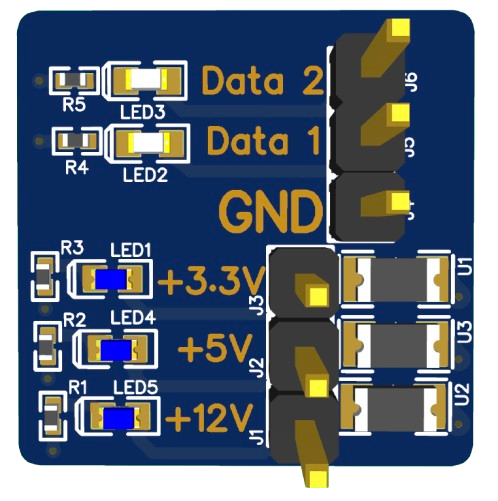 SI1145 Light Sensor
si1145_light_sensor·3 events·0 actions
si1145_light_sensor·3 events·0 actionsEvents
| Event key | Type | Value | Unit | Description |
|---|---|---|---|---|
uv_index | sensor | float | UV index (0-11+){"type":"sensor","key":"uv_index","value":5.2,"module_type":"si1145"} | |
visible_light | sensor | int | lux | Visible light level in lux{"type":"sensor","key":"visible_light","value":450,"module_type":"si1145"} |
infrared_light | sensor | int | Infrared light level{"type":"sensor","key":"infrared_light","value":120,"module_type":"si1145"} |
Actions
No actions accepted by this module.
 Potentiometer (Knob)
potentiometer·2 events·0 actions
potentiometer·2 events·0 actionsEvents
| Event key | Type | Value | Unit | Description |
|---|---|---|---|---|
knob_raw | sensor | int | Raw ADC value (0-4095){"type":"sensor","key":"knob_raw","value":2048,"module_type":"potentiometer"} | |
knob_position | sensor | float | % | Knob position as percentage (0-100){"type":"sensor","key":"knob_position","value":50.5,"module_type":"potentiometer"} |
Actions
No actions accepted by this module.
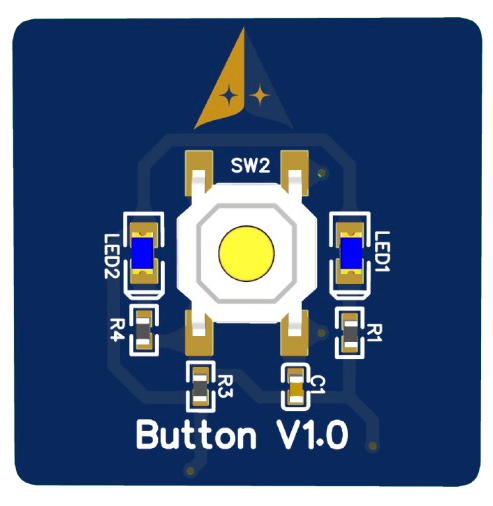 Button
button_module·2 events·0 actions
button_module·2 events·0 actionsEvents
| Event key | Type | Value | Unit | Description |
|---|---|---|---|---|
button_press | button | int | Button press event (value=1){"type":"button","key":"button_1","value":1} | |
button_release | button | int | Button release event (value=0){"type":"button","key":"button_1","value":0} |
Actions
No actions accepted by this module.
 Light Grid
neopixel_grid·0 events·7 actions
neopixel_grid·0 events·7 actionsEvents
No events emitted by this module.
Actions
| Action | Parameters | Description |
|---|---|---|
| — | Set all LEDs to RGB color{"action":"set_color","value":{"r":255,"g":0,"b":0}} |
| — | Set LED brightness (0-255){"action":"brightness","value":128} |
| — | Turn off all LEDs{"action":"clear","value":null} |
| — | Light a single LED by linear index (0-8 for 3x3 grid). r/g/b are 0-255.{"action":"set_pixel","value":{"index":4,"r":255,"g":0,"b":0}} |
| — | Light a single LED by row/column (0-2 each on the 3x3 grid){"action":"set_pixel_xy","value":{"row":1,"col":1,"r":255,"g":0,"b":0}} |
| — | Set every LED in row N (0-2) to RGB{"action":"set_row","value":{"row":0,"r":0,"g":255,"b":0}} |
| — | Set every LED in column N (0-2) to RGB{"action":"set_column","value":{"col":0,"r":0,"g":0,"b":255}} |
 Color Display
st7735_tft·0 events·11 actions
st7735_tft·0 events·11 actionsEvents
No events emitted by this module.
Actions
| Action | Parameters | Description |
|---|---|---|
| — | Display text on a cleared screen using the default font (white on black){"action":"display_text","value":"Hello World"} |
| — | Draw text at (x, y) with size multiplier and RGB565 color. Does NOT clear screen first.{"action":"draw_text","value":{"text":"Hi","x":10,"y":20,"size":2,"color":65535}} |
| — | Draw a single pixel at (x, y) in RGB565 color{"action":"draw_pixel","value":{"x":80,"y":40,"color":65504}} |
| — | Draw a line from (x0, y0) to (x1, y1) in RGB565 color{"action":"draw_line","value":{"x0":0,"y0":0,"x1":159,"y1":79,"color":65535}} |
| — | Draw an unfilled rectangle outline at (x, y) with size (w, h) in RGB565 color{"action":"draw_rect","value":{"x":20,"y":20,"w":40,"h":30,"color":2016}} |
| — | Draw a filled rectangle at (x, y) with size (w, h) in RGB565 color{"action":"fill_rect","value":{"x":20,"y":20,"w":40,"h":30,"color":63488}} |
| — | Draw an unfilled circle outline centered at (x, y) with radius r in RGB565 color{"action":"draw_circle","value":{"x":80,"y":40,"r":20,"color":2047}} |
| — | Draw a filled circle centered at (x, y) with radius r in RGB565 color{"action":"fill_circle","value":{"x":80,"y":40,"r":20,"color":2047}} |
| — | Fill the entire screen with a single RGB565 color (use 0 for black, 65535 for white){"action":"fill_screen","value":0} |
| — | Set display rotation: 0 = portrait, 1 = landscape (default), 2 = portrait flipped, 3 = landscape flipped{"action":"set_rotation","value":1} |
| — | Clear the display to black{"action":"clear_screen","value":null} |
 DC Motor
dc_motor·0 events·3 actions
dc_motor·0 events·3 actionsEvents
No events emitted by this module.
Actions
| Action | Parameters | Description |
|---|---|---|
| — | Set motor speed (-255 to +255, negative=reverse){"action":"motor_speed","value":200} |
| — | Coast to stop (free spin, no holding torque){"action":"motor_stop","value":null} |
| — | Active brake (short the motor terminals — stops faster, holds position briefly){"action":"motor_brake","value":null} |
Knobrotary_encoder_knob·2 events·2 actions
rotary_encoder_knob·2 events·2 actionsEvents
| Event key | Type | Value | Unit | Description |
|---|---|---|---|---|
knob_position | sensor | int | Current encoder position (cumulative turns){"type":"sensor","key":"knob_position","value":42,"module_type":"rotary_encoder"} | |
knob_press | button | int | Knob button pressed{"type":"button","key":"knob_press","value":1} |
Actions
| Action | Parameters | Description |
|---|---|---|
| — | Set LED ring color{"action":"set_ring_color","value":{"r":255,"g":0,"b":0}} |
| — | Set LED ring brightness (0-255){"action":"set_ring_brightness","value":128} |
 Microphone
microphone·2 events·0 actions
microphone·2 events·0 actionsEvents
| Event key | Type | Value | Unit | Description |
|---|---|---|---|---|
sound_level | sensor | int | RMS sound level (0-32767){"type":"sensor","key":"sound_level","value":1200,"module_type":"microphone"} | |
sound_detected | button | int | Sound above threshold detected{"type":"button","key":"sound_detected","value":1} |
Actions
No actions accepted by this module.
Robot Armrobot_arm·2 events·4 actions
robot_arm·2 events·4 actionsEvents
| Event key | Type | Value | Unit | Description |
|---|---|---|---|---|
joint_positions | sensor | string | All 6 joint positions as comma-separated values (0-4095 each){"type":"sensor","key":"joint_positions","value":"2048,2048,2048,2048,2048,2048","module_type":"robot_arm"} | |
joint_temp | sensor | int | C | Joint temperature in Celsius (specify joint in module_type){"type":"sensor","key":"joint_temp","value":38,"module_type":"robot_arm"} |
Actions
| Action | Parameters | Description |
|---|---|---|
| — | Move a single joint: value is 'joint_id:position[:time_ms]' e.g. '3:2048:500'{"action":"move_joint","value":"3:2048:500"} |
| — | Move all 6 joints: value is 'p1,p2,p3,p4,p5,p6[:time_ms]' e.g. '2048,2048,2048,2048,2048,2048:1000'{"action":"move_all","value":"2048,2048,2048,2048,2048,2048:1000"} |
| — | Center all joints to 2048. Value is optional time_ms e.g. '1000'{"action":"center_all","value":"1000"} |
| — | Set torque: value is 'on' or 'off' (all joints){"action":"set_torque","value":"on"} |
 Speaker
speaker·0 events·5 actions
speaker·0 events·5 actionsEvents
No events emitted by this module.
Actions
| Action | Parameters | Description |
|---|---|---|
| — | Play a tone at given frequency for duration (ms){"action":"play_tone","value":{"frequency":440,"duration":1000}} |
| — | Stop any sound{"action":"speaker_stop","value":null} |
| — | Like play_tone but with a short gap between notes — better for melodies (85% sound, 15% silence){"action":"play_note","value":{"frequency":523,"duration":250}} |
| — | Play multiple frequencies simultaneously (max 4) for the given duration in ms{"action":"play_chord","value":{"frequencies":[261,329,392],"duration":600}} |
| — | Set output volume (0.0 silent .. 1.0 max). Persists across tones.{"action":"set_volume","value":0.5} |
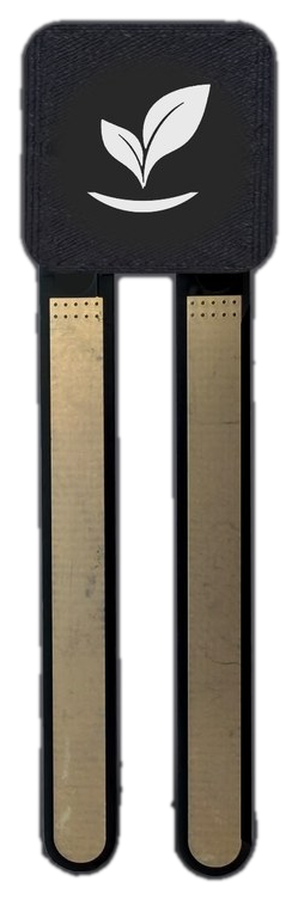 Soil Sensor
soil_sensor·4 events·7 actions
soil_sensor·4 events·7 actionsEvents
| Event key | Type | Value | Unit | Description |
|---|---|---|---|---|
moisture | sensor | float | % | Calibrated soil moisture, 0-100 %{"type":"sensor","key":"moisture","value":42.7,"module_type":"soil_sensor"} |
conductance | sensor | float | uS | Conductance between the prongs in microsiemens — the uncalibrated physical measurement{"type":"sensor","key":"conductance","value":18.4,"module_type":"soil_sensor"} |
soil_raw | sensor | int | counts | Raw oversampled ADC reading, 0-65472. High means dry. Record this when calibrating{"type":"sensor","key":"soil_raw","value":31200,"module_type":"soil_sensor"} |
soil | state | string | Probe condition: warming up, probe open, saturated, or ok{"type":"state","key":"soil","value":"probe open"} |
Actions
| Action | Parameters | Description |
|---|---|---|
| — | Record the current reading as the 0% point. Call with the probe held in air{"action":"calibrate_dry","value":null} |
| — | Record the current reading as the 100% point. Call with the prongs standing in water{"action":"calibrate_wet","value":null} |
| — | Force an immediate measurement instead of waiting for the next timer tick{"action":"read_now","value":null} |
| — | Set the on-module status LED, as "r,g,b" with each 0-255. Takes the LED out of its automatic red-to-green-to-blue moisture ramp until set_status_auto{"action":"set_status_color","value":"0,40,0"} |
| — | Return the status LED to its automatic moisture ramp: red dry, green moist, blue submerged{"action":"set_status_auto","value":null} |
| — | Turn the on-module status LED off. set_status_auto turns it back on{"action":"set_status_off","value":null} |
| — | Brightness of the automatic LED ramp, 0-255; default 24{"action":"set_status_brightness","value":24} |
Need the raw JSON? It lives at backend/src/lib/athera_modules/module_capabilities.json — this page mirrors it verbatim.
API Reference
The backend exposes a REST API. All requests go through a centralized URL builder that auto-detects the environment (local, staging, production).
POST/chatSend a prompt to the AI to generate a project
POST/projectsCreate a new project
GET/projects/:idGet project details
POST/buildsStart a firmware build
GET/builds/:idCheck build status
GET/builds/:id/firmwareDownload compiled firmware binary
Firmware & Flashing
Generated firmware targets the ESP32 microcontroller. The build system compiles your project server-side and produces downloadable binaries. You can flash directly from the browser using Web Serial API — no additional tools needed.
Each project picks a transport: WiFi (firmware connects to the gateway and exchanges JSON over a WebSocket) or USB Serial (firmware speaks the same JSON over Serial.println at 115200 baud, with the browser bridging it to the dashboard via the Web Serial API). Switching transport triggers a full rebuild.
Community & Socials
Join the community, follow along with development, and share what you build.